Built for Philippine printing shopsWindows POS + online ordersSecure account & storefront sync
PrintMarksPOSbusinessTools
Show me:
<!-- HOTFIX473: Developer Console uses the current index marketing shell; stale legacy developer design removed. -->
PRINTMARKS IN 10 SECONDS

A quick look at PrintMarks POS Tools

See the app in action, then download PrintMarks for your Windows printing-shop workflow.

10-SEC PROMO
POS + SalesCounter workflow Production ToolsEasy Print + Rush ID Synced Web StoreOrders return to app
PRINTMARKSPOS TOOLSBuilt for printing businesses
YOUR PRINTING BUSINESS • ONE CONNECTED SYSTEM

Run your printing business smarter, faster, and more organized.

POS, Easy Print, Rush ID, photo tools, inventory, reports, customers, and your own synchronized Web Store — connected in one PrintMarks ecosystem.

POSEasy PrintRush IDPhoto ToolsInventoryWeb Store
FOR PRINT-SHOP OWNERS

Run the whole shop in PrintMarks

Manage counter sales, production, inventory, customers, reports, and online orders.

View Plans
FOR PRINTING CUSTOMERS

Send a print job online

Find a participating shop, upload files, add instructions, and track your order.

Secure account syncWindows-first workflowResponsive Web Store
0Print units processed
0Completed print jobs
0Active online jobs
0Participating shops
0Registered users
0Regular reward days
THE PRINTMARKS ECOSYSTEM

From customer request to completed print job — without disconnected tools.

PrintMarks connects the front counter, production workspace, stock, business records, and online storefront so the same job can move through one system.

01CUSTOMER

Walk-in or online request

Receive the job at the counter or through your Web Store.

02POS

Create the transaction

Select the printing service, options, quantity, and payment.

03PRODUCTION

Prepare the print job

Use Easy Print, Rush ID, Photo Tools, or other production utilities.

04BUSINESS

Update records automatically

Sales, customer history, and material usage stay connected.

05WEB STORE

Keep online and offline synced

Catalog and customer orders connect back to the Windows workflow.

PREMIUM AUTOMATION & BUSINESS CONTROL

Advanced tools for faster production and a more connected shop

Premium brings the higher-level automation together: AI preparation, ID production, true costing, synchronized online orders, reporting, branding, and professional output.
Compare Premium plans
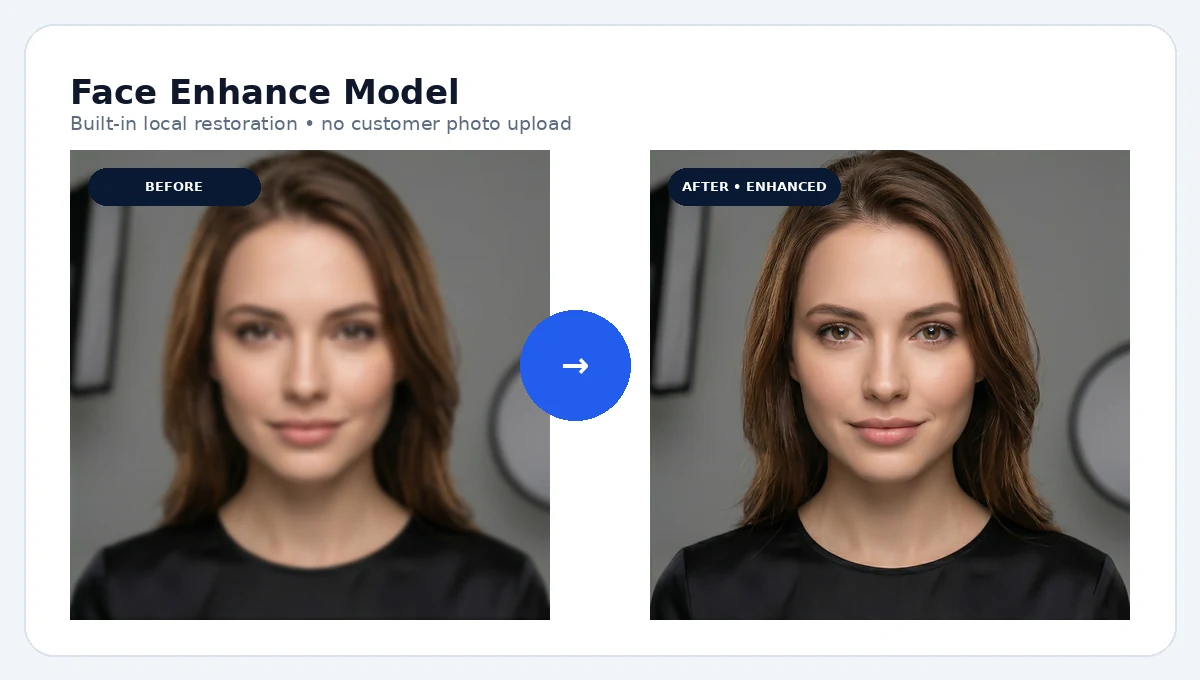
Face Enhance before and after result
AI PHOTO STUDIO

Face Enhance + Background Removal

Prepare portraits for IDs, memorial photos, layouts, and customer reprints without moving every cleanup task to a separate app.
  • Face detail enhancement
  • Human subject cutout
  • Built-in production workflow
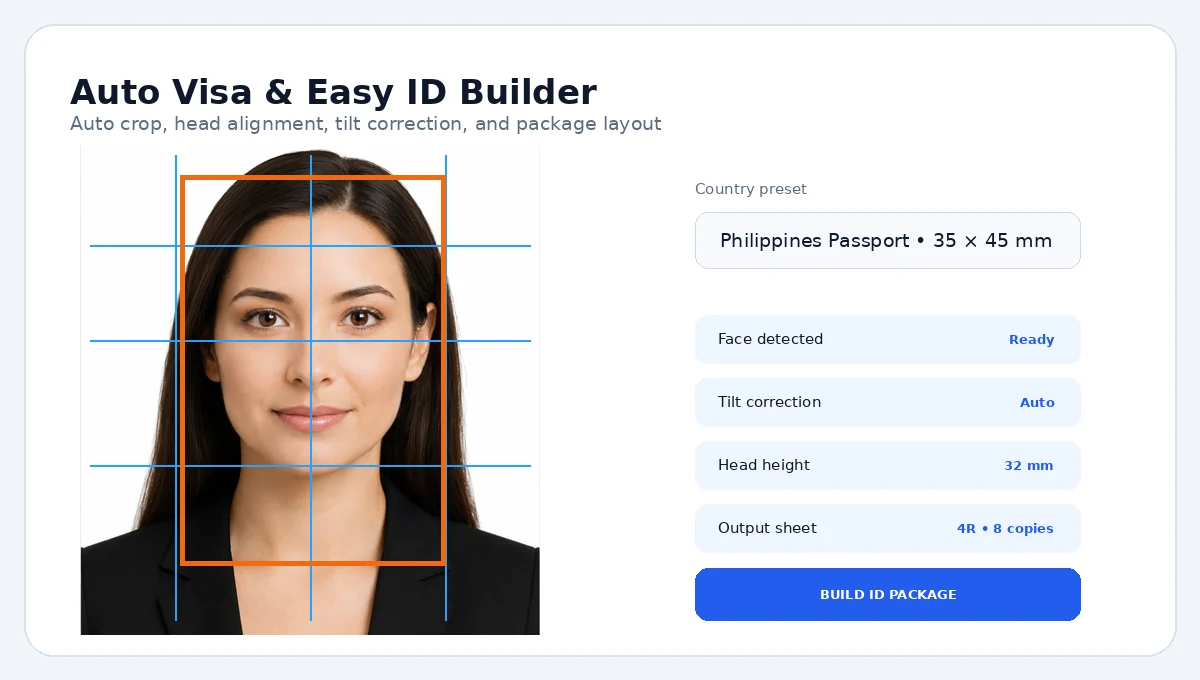
Auto Visa and ID preparationID AUTOMATION

Auto Visa, Rush ID & Smart ID

Use guided crop, alignment, background preparation, packages, and batch ID workflows for repeatable ID production.
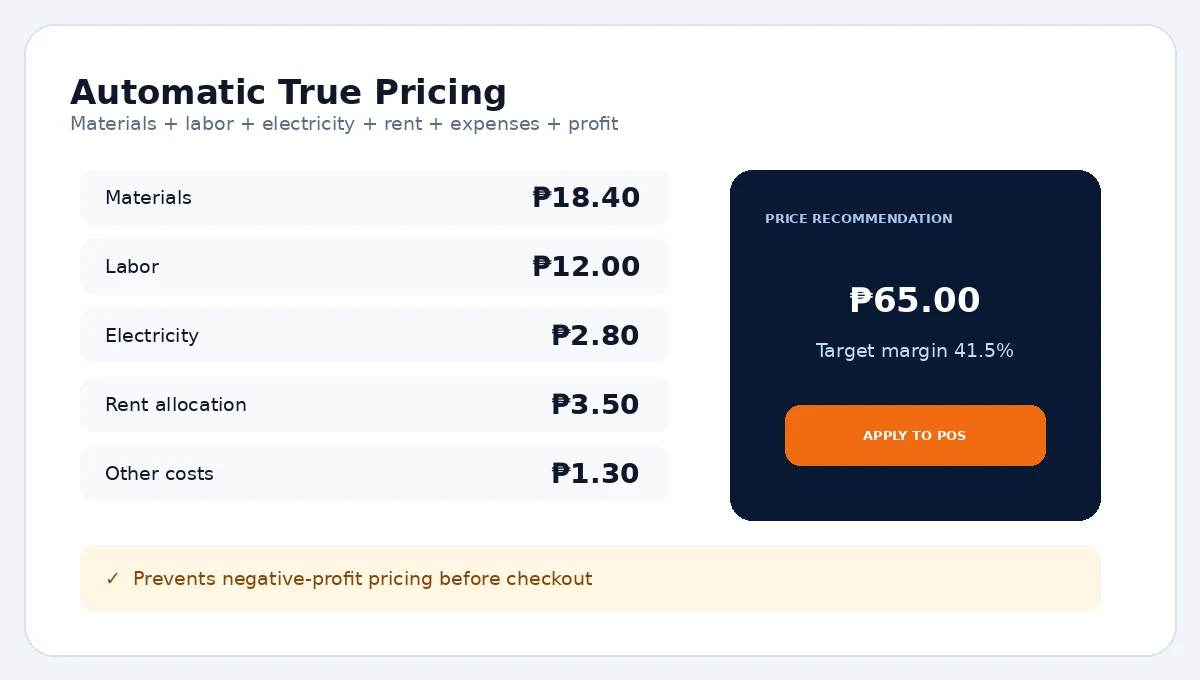
Automatic pricing toolsPROFIT CONTROL

Automatic Pricing + True Metrics

Use material, operating, and production costs to protect margins and understand the real performance of each service.
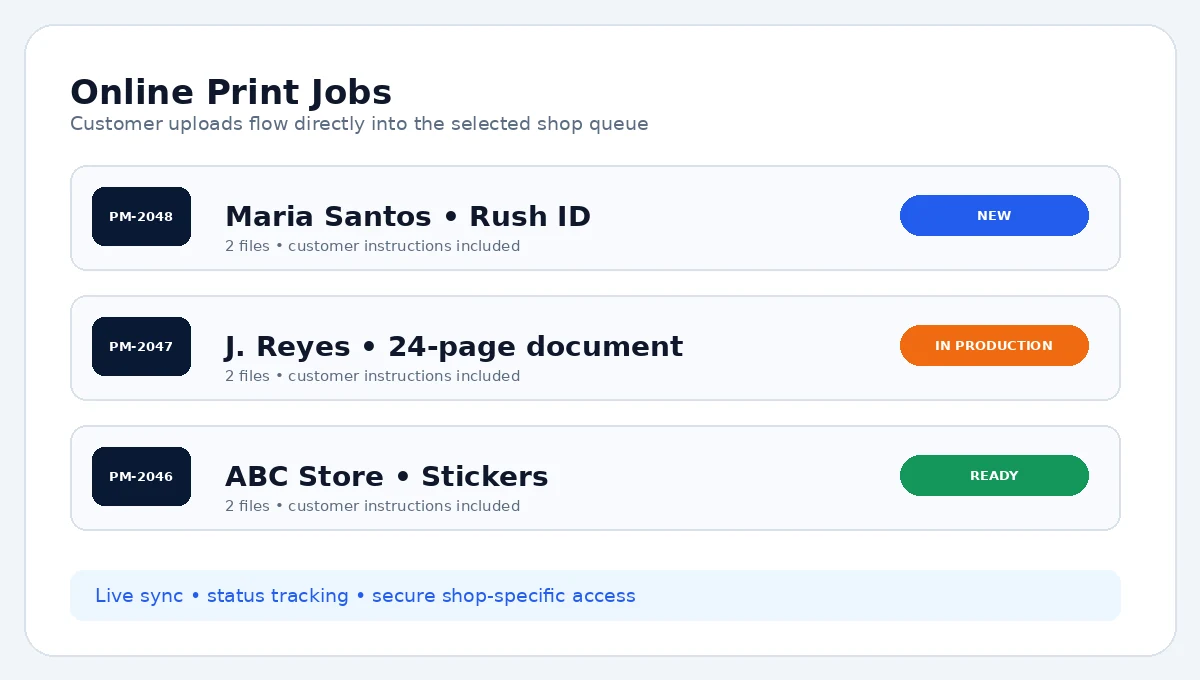
Connected online print jobsCONNECTED STOREFRONT

Your synchronized PrintMarks web store

Publish the catalog once and receive customer orders, files, and job details in the Windows app without manually maintaining two service lists.
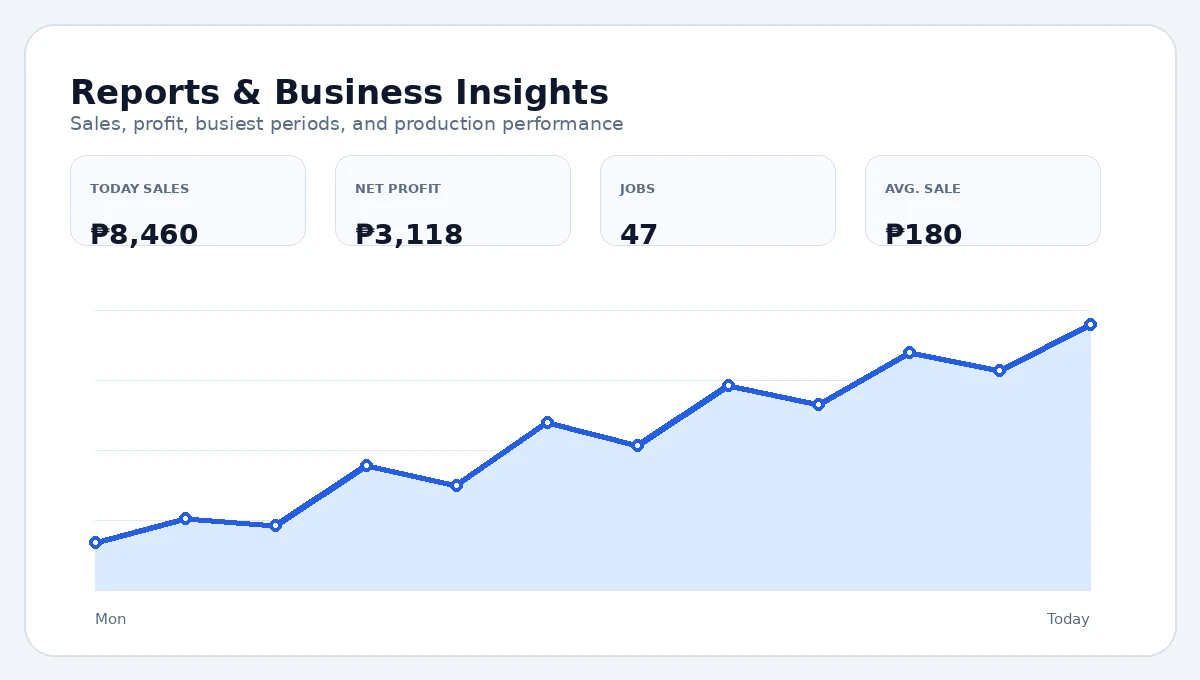
Reports and business analyticsBUSINESS VISIBILITY

Reports, exports & decision-ready metrics

Review sales, production, margin, workload, and exportable records from the same system that processed the job.

Company Profile brandingThermal receiptsInvoicesBatch processingAuto Print by FilenamePM Photo EditorLight / Dark / Cyber PunkAdvanced templates
PROFESSIONAL FINISH

Branding, documents & advanced production utilities

Keep customer-facing output and higher-level production tools inside the same PrintMarks workflow instead of scattering them across separate utilities.

HOW PRINTMARKS WORKS

See each PrintMarks workflow without loading every video at once

Select a workflow to view its logic, key steps, and available real app demo. Videos remain unloaded until you choose to play them.

Loading workflow preview…
REALISTIC INTERACTIVE DEMO

Explore a closer preview of the actual Windows application

Preview the refined Dashboard, POS Register, Inventory, AI Studio, Easy Print, and online-order experience across desktop and mobile.

♛ Premium unlocks automatically after approval

See the actual workflow before you install

Switch through the Dashboard, POS Register, Inventory, and AI Studio preview to understand how the Windows workspace is organized.

✓Preview the cashier-focused Dashboard and POS.
✓See stock control and production-oriented screens.
✓Open the Premium AI Studio preview.
✓Use the demo as a quick product tour before downloading.
Download Windows installer
PrintMarksPOSbusinessToolsPrinting Operations Workspace
—□×
PrintMarks Printing ServicesAdministrator • Premium Active
♛ PREMIUM
BUSINESS OVERVIEW

Dashboard

Friday, July 31
Today Sales₱8,460+18.4% vs yesterday
Net Profit₱3,11836.9% margin
Completed Jobs476 currently processing
Low Stock3Needs attention
Sales performanceLast 7 days
Recent jobsLive queue

PM-2048 • Rush IDMaria SantosNew

PM-2047 • Documents24 pages • coloredPrinting

PM-2046 • StickersABC StoreReady

● Online account connectedCPU AI readyPrinter: Epson WF-C5390
SUPPORTED WINDOWS PCS

Start on a normal shop computer and scale up when needed

PrintMarks starts well on a normal shop PC, then scales cleanly for busier storefronts, online ordering, and higher-volume production.

Minimum
  • Windows 10 or 11, 64-bit
  • Intel/AMD 4-core CPU
  • 8 GB RAM
  • 10 GB free storage
  • CPU AI mode
  • 1366×768 display
High-volume
  • Modern 8-core CPU
  • 32 GB RAM
  • Fast NVMe SSD
  • NVIDIA 6 GB+ VRAM
  • Reliable broadband for web sync
  • Regular database backups
SIMPLE ONBOARDING

From registration to the first completed sale

01

Create a shop account

Create one PrintMarks account with Continue with Google or a verified email/password. The same account identity is used by the website and Windows app.

02

Start the trial

Choose Start Trial in the Windows app when your shop is ready. The current Developer-controlled policy is shown before activation.

03

Configure your shop

Add inventory, printers, services, prices, company details, and payment settings.

04

Process real orders

Use POS for walk-ins and receive online jobs from customers through the web portal.

PRINTMARKS PARTNER PROGRAM

Grow PrintMarks with us.

Apply once, receive your tracked Partner identity after approval, and earn eligible rewards from verified activations. No inventory or technical setup is required.

01 Apply02 Share your tracked link03 Track verified activations
PARTNER BENEFITS

Benefits of becoming a partner

Simple to join, easy to track, with secure qualification rules handled by PrintMarks.

₱
Eligible commission

Earn at the Developer-approved rate on verified paid activations.

◎
Tracked dashboard

See qualified customers, activations, progress, and rewards.

⚡
Partner support

Get a dedicated path for Partner-program and referral concerns.

Partner levels & fair reward rulesSee the full qualification and reward details when you need them.
REFER & UNLOCK

Share PrintMarks. Earn one full Regular day.

Invite another printing shop with your personal referral link. When that new account completes its first verified paid plan, your account receives one full day of Regular access for standard shop production tools.

One verified paid referral→1 Regular day
View my rewards
SECURE BY DESIGN

Fair rewards, protected accounts

  • Rewards apply only after a verified paid plan.
  • Self-referrals and repeated accounts do not qualify.
  • Each account is secured to one verified Windows PC.
  • Suspicious or abusive activity is reviewed and can be blocked.
ONE DEVICE • CLEAR ACCESS • EASY UPGRADES

Choose the plan that matches your shop

Every paid plan is a one-time payment for its stated term — no automatic renewal. Access stays tied to one verified account and one Windows device, while controlled transfer protects honest buyers and prevents sharing.

TRY PREMIUM FIRST

Explore the complete PrintMarks Premium workflow free

Create an account and try the complete Premium workflow before choosing the plan that fits your shop.

Download Windows app
TRY THE ESSENTIALS

Lite

₱30 / 30 days

Unlimited Rush ID, Photo Print, and Document Print starter production for 30 days, with real access to key smart tools before moving up.

  • Unlimited Rush ID starter production
  • Unlimited Photo Print starter production
  • Unlimited Document Print starter production
  • Basic Inventory for Photo Paper and Bond Paper
  • POS checkout and transaction history
  • 10 Face Enhance uses / active Lite term
  • 10 Background Removal uses / active Lite term
  • 10 Smart Auto-Pricing uses / active Lite term
  • Included smart-tool uses are consumed first; Tool Points are offered only after that allowance reaches 0
  • Tool Points for selected eligible advanced tools
BEST FOR MOST SHOPS

Regular Monthly

₱99 / 30 days

The strongest everyday value for a working local print shop: full production tools plus smart features you can use without worrying about a tiny monthly counter.

  • Everything in Lite
  • Unlimited standard services and Easy Print
  • Full Inventory & BOM
  • Sales & Reports
  • Admin Settings
  • Price List Generator
  • True Metrics & POS Insights — view only
  • Manual Subject Editor and Refine tools
  • Rush ID Auto Crop & Align
  • Unlimited Face Enhance
  • Unlimited Smart Auto-Pricing
  • Unlimited Background Removal
  • 3 Calling Card Builder jobs / month
  • 3 Ticket Builder jobs / month
  • Smart ID/Certificates Builder requires Premium
  • Advanced automation and connected shop tools unlock with Premium
GROW + AUTOMATE

Premium Monthly

₱188 / 30 days

For shops that want the limits removed and the full connected, branded, automated PrintMarks workflow.

  • Everything in Regular
  • Smart ID/Certificates Builder + unlimited Calling Card / Ticket Builder use
  • Editable True Metrics cost assumptions
  • Light / Dark / Cyber Punk theme customization
  • PM Photo Editor
  • Unlimited Face Enhance
  • Unlimited Background Removal
  • Auto Visa & advanced ID preparation
  • Batch Processing
  • Auto Print by Filename
  • Company Profile branding
  • Printed thermal receipts and invoices
  • Premium CSV & professionally formatted Excel business-data export
  • Online Print Jobs and storefront workflow
  • Service customization and Template Builder
  • PISO Net / Guest Wi-Fi
PRINTMARKS SHOP NETWORK

Discover Printing Shops

Find trusted printing shops, check availability, and choose the best service near you.

Discover Printing ShopsLoading the PrintMarks network…
Loading shops…
DIRECT SHOP ORDERS

Send an order in seconds — even without creating an account

Perfect for walk-in customers. Post your shop link or QR code in-store and let customers send files, notes, and print requests straight to your workspace from any phone, tablet, or computer.

PRINTMARKSSMART PRINT ORDER
SEND FILES TO

Choose a printing shop

Create a walk-in or detailed print order from your phone, tablet, or computer.

Fast order: enter the customer name, choose the service, then add files or instructions when needed.
UPLOAD FILESAdd PDF, DOCX, JPG, PNG, or supported print files. Files remain optional for a quick walk-in request.
Choose a shop to continueYour order will be sent securely to the selected printing shop.
Quick Walk-In orderOnly the customer name and order type are required.

SUPPORT CONTINUED DEVELOPMENT

Help PrintMarks keep improving

Voluntary support helps fund Windows compatibility, AI-model integration, security maintenance, online-order infrastructure, and new printing workflows. This is not a tax-deductible donation.

₱
You choose the amount. Nothing is preselected.
Find a shop & start an order